How to Check RERA Status: Step-by-Step Tutorial to Verify Builder Credentials Online
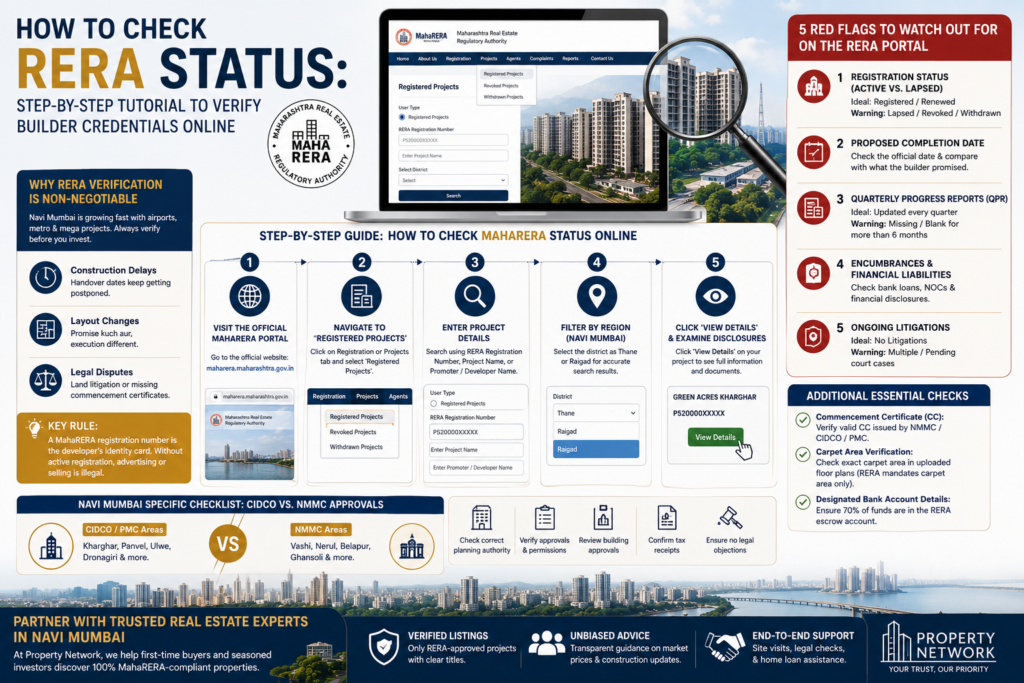
Planning to buy your dream home in Navi Mumbai? Whether you are looking at a 2 BHK in Kharghar, an investment plot in Panvel, or an upcoming high-rise in Ulwe, sabse pehle RERA status check karna seekho!
In the real estate world, glossy brochures and attractive 3D renders mean nothing if the project isn’t backed by government-approved documentation. Under the Real Estate (Regulation and Development) Act, 2016 (RERA), every developer in Maharashtra must register their project with MahaRERA before marketing, booking, or selling even a single flat.
In this detailed step-by-step guide, hum seekhenge how you can check a project’s RERA status online within 5 minutes—without relying on middleman claims or sales pitch promises.
Why RERA Verification is Non-Negotiable for Navi Mumbai Buyers
Navi Mumbai is expanding rapidly with mega-infrastructure projects like the Navi Mumbai International Airport (NMIAL), MTHL (Atal Setu), and new Metro lines. Because demand is high, many unverified or pre-launch projects try to attract buyers with cheap booking offers.
MahaRERA registration check nahi kiya, toh standard risks kya hain?
- Construction Delays: Builder handover date post-pone karte rehte hain without accountability.
- Layout Changes: Promise kuch aur, execution complete different.
- Legal Disputes: Land litigation or missing Commencement Certificates (CC).
Key Rule: A MahaRERA registration number (e.g., P520000XXXXX) is the developer’s identity card. Without an active registration, advertising or selling a property is illegal.
Step-by-Step Guide: How to Check MahaRERA Status Online
Follow this simple tutorial to perform a complete background verification on any property in Navi Mumbai.
Visit the Official MahaRERA Portal
Step 1
Open your browser and navigate directly to the official Maharashtra RERA portal: maharera.maharashtra.gov.in. Avoid third-party aggregators or broker websites—always rely on the official government database.
Navigate to ‘Registered Projects’
Step 2
On the homepage main menu, hover over or click on the Registration or Projects tab, then select Registered Projects. You don’t need to log in or create an account to do a basic search.
Enter Project Details
Step 3
Select User Type as “Registered Projects”. You can search using any of the following parameters:
RERA Registration Number: Fastest and most precise method (e.g., searching P520…).
Project Name: Enter the exact project title (e.g., Green Acres Kharghar).
Promoter / Developer Name: Search the parent entity name to view all past and current projects managed by that builder.
Filter by Region (Navi Mumbai)
Step 4
For refined results, select the district as Thane or Raigad (depending on the location in Navi Mumbai—for instance, Vashi & Airoli fall under Thane, while Kharghar, Panvel & Ulwe fall under Raigad).
Click ‘View Details’ and Examine Disclosures
Step 5
When your target project appears in the search results, click View Details. This opens the complete project master file filed by the developer under oath.
5 Red Flags to Watch Out for on the RERA Portal
Once you open the project profile page, sirf green status dekh kar satisfied mat ho jaana. Dig deeper into these critical data fields:
1. Registration Status (Active vs. Lapsed)
The ideal status for any ongoing project is Registered or Renewed, which confirms you can proceed with a detailed document check. A major warning sign is when the status shows Lapsed, meaning the official registration period expired without a valid extension from the authority—iska matlab construction slow hai ya halt ho chuka hai. Statuses like Revoked or Withdrawn are severe red flags, and you should never invest money in those projects.
2. Proposed Completion Date
Always check the official proposed completion date submitted to MahaRERA and compare it to what the sales representative promised you verbally. If the portal shows a date that has already passed without an official extension update, the project is running behind schedule.
3. Quarterly Progress Reports (QPR)
MahaRERA mandates that builders upload regular quarterly progress reports detailing construction milestones and financial updates. The ideal scenario is seeing these reports updated consistently every quarter. A clear warning sign is missing or blank QPR reports for longer than 6 months, which indicates poor transparency.
4. Encumbrances and Financial Liabilities
In the project summary, look closely at the bank mortgage and encumbrance section. Ideally, the builder should clearly disclose all existing loans alongside proper No Objection Certificates (NOCs) from financing institutions. Unclear or hidden financial liabilities mean the builder might face a cash crunch during construction.
5. Ongoing Litigations
Check the litigation tab to see if there are court proceedings involving the land or the developer. While minor, resolved legal notices may appear, the ideal scenario is “No Litigations” reported. Multiple serious or pending court cases mean the property could get tangled in long-term legal disputes.
Additional Essential Checks:
- Commencement Certificate (CC): Check the Uploaded Documents section. Verify whether the municipal authority (NMMC, CIDCO, or PMC) has issued a valid Commencement Certificate for the specific floor you plan to purchase.
- Carpet Area Verification: RERA strictly mandates selling properties on Carpet Area only—not super built-up area. Check the exact sq. ft. area stated in the uploaded floor plans on the MahaRERA portal.
- Designated Bank Account Details: By law, 70% of all funds collected from buyers must be deposited into an escrow bank account dedicated solely to that specific project’s construction cost. Make sure your booking cheques are drawn in favor of the official RERA account listed on the portal.
Navi Mumbai Specific Checklist: CIDCO vs. NMMC Approvals
Navi Mumbai has specific developmental authorities depending on the micro-market:
- Kharghar, Panvel, Ulwe, Dronagiri: Managed primarily by CIDCO (City and Industrial Development Corporation) and PMC (Panvel Municipal Corporation).
- Vashi, Nerul, Belapur, Ghansoli: Managed by NMMC (Navi Mumbai Municipal Corporation).
Partner with Trusted Real Estate Experts in Navi Mumbai
Navigating home searches, legal verification, and home loan documentation doesn’t have to be overwhelming.
At Property Network, we help first-time buyers and seasoned investors discover 100% MahaRERA-compliant residential and commercial properties across Kharghar, Panvel, Ulwe, and Vashi.
- Verified Listings: Only RERA-approved projects with clear titles.
- Unbiased Advice: Transparent guidance on market prices and construction updates.
- End-to-End Support: Site visits, legal checks, and home loan assistance.